
Running a successful Shopify store requires more than just listing products and hoping for the best. Many Shopify store owners face issues like slow loading speeds, poor mobile optimization, vague product descriptions, and limited payment options, which hurt sales and hinder growth. In fact, 79% of Shopify traffic and about 69% of orders now come from mobile devices, making mobile optimization critical for improving conversions and sales.
To fix these problems, it’s essential to optimize your site for mobile responsiveness, speed up your site by compressing images, write clear product descriptions, and offer a variety of payment methods. Streamlining the checkout process, using SEO to attract more traffic, and improving customer service are also crucial steps to build trust and boost conversions. For many businesses, partnering with a professional Shopify store agency can help implement these improvements more effectively and ensure the store is optimized for performance and growth.
This blog will walk you through the most common Shopify store mistakes and offer practical solutions. By addressing these key areas, you’ll enhance the user experience, increase conversions, and create a more successful Shopify store. Let’s dive into the details and start optimizing your store.
Key Takeaways:
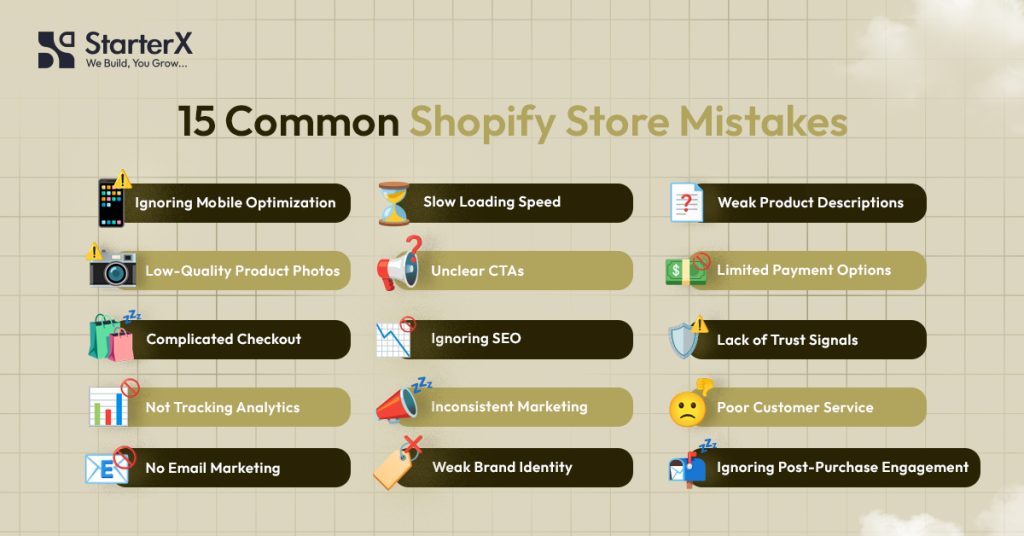
- Mobile Optimization Matters: Ensure your store is mobile-friendly for the growing number of mobile shoppers.
- Site Speed is Critical: Slow load times lead to high bounce rates; compress images and optimize your site.
- Write Clear Product Descriptions: Detailed, benefit-focused descriptions help customers make informed decisions.
- High-Quality Product Photos: Invest in professional images to showcase your products and build trust.
- Clear Calls-to-Action (CTAs): Use strong, action-oriented CTAs to guide visitors and increase conversions.
- Offer Multiple Payment Options: Diversify payment methods to cater to different customer preferences.
- Simplify the Checkout Process: A smooth checkout reduces friction and prevents cart abandonment.
- Leverage SEO for More Traffic: Optimize your store for search engines to attract organic traffic.
- Build Trust with Social Proof: Use customer reviews, testimonials, and trust badges to enhance credibility.
- Use Analytics to Improve Performance: Regularly monitor your analytics to identify areas for improvement.
- Consistent Marketing is Key: Engage customers through email, social media, and paid ads to drive traffic.
- Customer Service Builds Loyalty: Provide excellent support to encourage repeat purchases.
- Use Email Marketing Effectively: Send welcome emails, abandoned cart reminders, and product recommendations.
- Build a Clear Brand Identity: Keep your colors, fonts, voice, and message consistent across your store.
- Post-Purchase Engagement: Continue engaging customers after a sale to increase retention.
By addressing these mistakes and following the fixes outlined here, you’ll optimize your Shopify store for better performance, higher sales, and a better overall customer experience. If you are new to e-commerce, understanding how to start a Shopify store step by step can help you build a strong foundation before scaling your business.
Mistake 1: Ignoring Mobile Optimization
Why Mobile Optimization Matters:
With most shoppers using mobile devices, a mobile-friendly store is crucial for keeping customers engaged and avoiding high bounce rates. A non-optimized site can hurt your SEO rankings and decrease traffic.
How to Fix It:
- Use a Responsive Theme: Choose a mobile-friendly theme that adjusts to all screen sizes.
- Test Your Site on Mobile: Regularly check how your store looks and works on different mobile devices.
- Optimize Navigation: Simplify menus for easier mobile browsing.
- Improve Site Speed: Compress images and reduce unnecessary apps to speed up your site.
- Enable Mobile Payments: Ensure your checkout is mobile-friendly for easy transactions.
Optimizing for mobile will improve user experience, increase traffic, and boost your SEO rankings.
Mistake 2: Slow Website Loading Times
Why Slow Loading Times Matter:
Slow websites lead to high bounce rates and lost sales. Shoppers expect sites to load within 3 seconds, and delays can hurt both user experience and SEO rankings, affecting visibility and conversions.
How to Fix It:
- Compress Images: Use tools to reduce image file sizes without sacrificing quality.
- Minimize Apps & Scripts: Remove unnecessary apps and scripts to improve load times.
- Choose a Lightweight Theme: Select a theme optimized for speed to avoid heavy elements.
- Enable Browser Caching: Store files on users’ devices to speed up future visits.
- Use a Content Delivery Network (CDN): Shopify provides a CDN to improve global access speed.
Improving site speed boosts SEO, enhances user experience, and increases conversions.
Mistake 3: Poor Product Descriptions
Why Product Descriptions Matter:
Vague or unclear product descriptions can confuse customers and lead to abandoned carts. Detailed, benefit-driven descriptions help customers make informed decisions and improve your SEO ranking, making your products easier to find.
How to Fix It:
- Focus on Benefits: Highlight how the product solves customer problems or enhances their life.
- Be Clear and Concise: Write simple, easy-to-read descriptions that cover key details without being overly long.
- Include Key Information: Add necessary details like size, color, material, and care instructions.
- Use Bullet Points: Break down key features for easy scanning.
- Incorporate SEO Keywords: Include relevant keywords to improve search rankings.
- Add Customer Reviews: Social proof can boost confidence and encourage purchases.
Clear, informative product descriptions help build trust, improve conversions, and make products easier to discover online.
Mistake 4: Not Using High-Quality Product Photos
Why Product Photos Matter:
Clear, high-quality images are essential for online shopping. Low-quality or unclear photos can make products appear untrustworthy and lead to lower conversions. High-quality images build trust and help customers make purchasing decisions.
How to Fix It:
- Use High-Resolution Images: Ensure photos are sharp and clear for better presentation.
- Show Multiple Angles: Display your product from different angles to give customers a full view.
- Enable Zoom Features: Allow users to zoom in for a closer look at details.
- Use Lifestyle Images: Show products in real-life settings to help customers envision use.
- Maintain Consistency: Keep lighting, background, and image style consistent across your store.
- Optimize Image Sizes: Compress images for faster page load times without sacrificing quality.
Great product photos enhance credibility, improve user experience, and drive more conversions.
Mistake 5: Not Using Clear Calls-to-Action (CTAs)
Why CTAs Matter:
Clear and compelling CTAs guide visitors through your store and increase conversions. Without clear CTAs, users may get confused or unsure of what to do next, leading to cart abandonment and missed sales.
How to Fix It:
- Use Bold, Contrasting Colors: Make CTAs stand out on the page.
- Action-Oriented Text: Use direct phrases like “Shop Now,” “Add to Cart,” or “Buy Now.”
- Keep It Simple: Use short, easy-to-understand messages.
- Place CTAs Strategically: Position them where customers are most likely to take action (e.g., near product images or the checkout button).
- Create Urgency: Phrases like “Limited Time Offer” can encourage immediate action.
- Test and Optimize: Regularly test CTA variations to see which works best.
Effective CTAs lead customers to take action, increasing sales and improving user experience.
Mistake 6: Limiting Payment Options
Why Payment Options Matter:
Limiting payment methods can cause friction and lead to cart abandonment. Customers expect flexibility, and not offering their preferred payment option can stop them from completing their purchase.
How to Fix It:
- Accept Credit/Debit Cards: Ensure you support major cards like Visa, MasterCard, and American Express.
- Integrate PayPal: PayPal is trusted globally and can boost conversions.
- Enable Mobile Payments: Add Apple Pay and Google Pay for mobile shoppers.
- Offer Buy Now, Pay Later (BNPL): Services like Afterpay and Klarna appeal to customers who prefer installment payments.
- Support Local Payment Methods: Add regional payment options for international customers.
- Simplify Checkout: Keep the payment process quick and easy to avoid drop-offs.
Providing multiple payment options increases convenience, reduces cart abandonment, and improves conversion rates.
Mistake 7: Overcomplicating the Checkout Process
Why a Complicated Checkout Matters:
A lengthy or complex checkout process can frustrate customers and lead to cart abandonment. The more steps required to complete a purchase, the more likely users are to leave without buying.
How to Fix It:
- Use One-Page Checkout: Simplify the process by using a single-page checkout to speed up the experience.
- Offer Guest Checkout: Allow customers to check out without creating an account to reduce friction.
- Minimize Form Fields: Only ask for essential information, like shipping and payment details.
- Provide Clear Progress Indicators: Let customers know how many steps are left to complete the purchase.
- Highlight Secure Payment Options: Show trust badges and reassure customers that their data is safe.
Simplifying the checkout process reduces friction, boosts conversions, and leads to a better overall shopping experience.
Mistake 8: Not Leveraging SEO Properly
Why SEO Matters:
Without proper search engine optimization (SEO), your Shopify store might not show up in search results, meaning fewer customers will find your store. Good SEO increases visibility and drives organic traffic, leading to more sales.
How to Fix It:
- Use Relevant Keywords: Research and include targeted keywords in your product titles, descriptions, and meta tags.
- Optimize Product Images: Add descriptive alt text to all images to improve search engine visibility.
- Improve URL Structure: Ensure URLs are clean and descriptive, including keywords where possible.
- Create Fresh Content: Regularly update your store with blog posts, guides, or product updates to improve rankings.
- Build Backlinks: Get links from reputable sites to increase authority and SEO ranking.
By optimizing your site for search engines, you’ll drive more organic traffic, increase visibility, and ultimately boost sales.
Mistake 9: Failing to Build Trust
Why Trust Matters:
Building trust with customers is crucial for encouraging purchases and fostering loyalty. Without trust signals like reviews, testimonials, or security badges, customers may hesitate to buy, especially from a new or unfamiliar store.
How to Fix It:
- Add Customer Reviews: Display product reviews to provide social proof and reassure potential buyers.
- Use Trust Badges: Show security badges like SSL certificates and secure payment icons to guarantee safe transactions.
- Offer Clear Return Policies: Make return and refund policies easy to find and transparent to build confidence.
- Showcase Testimonials: Highlight positive feedback from customers or influencers to boost credibility.
- Provide Contact Information: Make your contact details easy to access for customer support, showing you’re reachable and reliable.
By implementing trust-building elements, you’ll reassure shoppers, reduce cart abandonment, and increase conversions.
Mistake 10: Not Using Analytics to Track Performance
Why Analytics Matter:
Without tracking key metrics, you can’t know how well your store is performing or where to improve. Analytics help identify areas of strength and weakness, allowing you to make data-driven decisions to boost sales and customer experience.
How to Fix It:
- Use Shopify Analytics: Regularly check your Shopify dashboard to monitor traffic, sales, and customer behavior.
- Set Up Google Analytics: Integrate Google Analytics to track deeper insights, such as conversion rates, user flow, and referral sources.
- Monitor Conversion Rates: Track how many visitors complete purchases, and identify any obstacles that might cause abandonment.
- Check Bounce Rates: Analyze high bounce rates to pinpoint pages that need optimization.
- A/B Test: Test different versions of your pages, product descriptions, or CTAs to see what drives better results.
Using analytics helps you optimize your store, improve user experience, and ultimately increase sales.
Mistake 11: Lack of Consistent Marketing Efforts
Why Consistent Marketing Matters:
Inconsistent marketing can lead to lost opportunities and a lack of steady traffic. Without a clear, ongoing strategy, your Shopify store may struggle to attract new customers and retain existing ones. Consistent marketing helps build brand recognition and keeps your audience engaged.
How to Fix It:
- Set Up Email Campaigns: Use email marketing to stay connected with customers, from welcoming new subscribers to sending product updates and promotions.
- Leverage Social Media: Post regularly on social platforms to drive traffic and engage with your audience.
- Run Paid Ads: Invest in Facebook, Instagram, or Google ads to increase visibility and attract targeted traffic.
- Use Retargeting: Re-engage past visitors with retargeting ads to encourage them to return and complete purchases.
- Collaborate with Influencers: Partner with influencers to reach a broader audience and increase brand awareness.
Consistent marketing helps attract new customers, increase retention, and drive steady growth for your store.
Mistake 12: Neglecting Customer Service
Why Customer Service Matters:
Poor customer service can lead to negative reviews, abandoned carts, and lost sales. Customers expect quick responses and helpful support. If they don’t get it, they’re likely to turn to competitors. Great customer service builds loyalty and trust, encouraging repeat purchases.
How to Fix It:
- Offer Multiple Contact Channels: Provide various ways for customers to reach you, including email, live chat, and phone support.
- Respond Promptly: Aim to respond to customer inquiries within 24 hours to keep them satisfied and engaged.
- Create a FAQ Section: Anticipate common questions and provide clear, concise answers to reduce the need for direct support.
- Be Transparent: Address customer complaints or issues openly and professionally.
- Implement a Return Policy: Make returns and exchanges straightforward to reassure customers.
Excellent customer service fosters loyalty, reduces friction, and can significantly improve your store’s reputation and sales.
Mistake 13: Not Using Email Marketing Effectively
Why Email Marketing Matters:
Email marketing is one of the most effective ways to engage with customers, nurture relationships, and drive sales. Failing to leverage this channel means missing out on an opportunity to re-engage past customers and increase conversion rates.
How to Fix It:
- Build an Email List: Encourage visitors to sign up for newsletters, special offers, or updates. Use pop-ups or incentives like discounts to grow your list.
- Send Abandoned Cart Emails: Recover lost sales by sending automated reminders to customers who left items in their cart.
- Segment Your Audience: Tailor your emails to specific customer segments based on their behaviors or preferences.
- Personalize Emails: Include the customer’s name, past purchases, or relevant recommendations to make emails feel more personal.
- Test Campaigns: A/B test subject lines, content, and offers to optimize engagement.
Effective email marketing helps boost retention, drive repeat purchases, and increase overall sales.
Mistake 14: Not Having a Clear Brand Identity
Why Brand Identity Matters:
A clear and consistent brand identity helps your store stand out and builds trust with your customers. Without a defined brand voice, visual style, and messaging, your store may appear disjointed, making it harder for customers to connect with your products.
How to Fix It:
- Define Your Brand Voice: Establish a tone that reflects your store’s personality, whether it’s friendly, professional, or fun.
- Create a Consistent Visual Style: Use consistent colors, fonts, and imagery across your site, social media, and marketing materials.
- Craft a Unique Value Proposition: Clearly explain why your products are different or better than competitors and why customers should choose you.
- Tell Your Brand Story: Share the story behind your business to create a personal connection with your audience.
- Ensure Consistency Across Platforms: Align your messaging and visuals across all touchpoints, from your website to social media.
A strong brand identity builds recognition, trust, and customer loyalty, ultimately driving sales and long-term success.
Mistake 15: Ignoring Post-Purchase Engagement
Why Post-Purchase Engagement Matters:
Focusing only on the sale and neglecting post-purchase communication can cost you repeat business. Engaging with customers after they make a purchase helps build loyalty, encourages reviews, and increases the likelihood of repeat purchases.
How to Fix It:
- Send Thank-You Emails: Show appreciation for the purchase and offer related product recommendations.
- Request Product Reviews: Encourage customers to leave feedback to build social proof and trust for future buyers.
- Offer Loyalty Rewards: Provide discounts, points, or exclusive offers for repeat customers to encourage return visits.
- Follow Up with Order Tracking: Send updates on shipping and delivery to keep customers informed and satisfied.
- Provide Easy Returns: Make returns hassle-free to ensure customer satisfaction and retention.
Post-purchase engagement helps turn one-time buyers into loyal customers, boosting lifetime value and brand loyalty.
Final Thoughts
Optimizing your Shopify store is key to increasing sales and building customer loyalty. By addressing common mistakes like poor mobile optimization, slow load times, unclear product descriptions, and limited payment options, you can improve the shopping experience and boost conversions.
Consistency is crucial; regularly monitor your store’s performance, track key metrics, and adapt strategies. With the right approach to marketing, customer service, and post-purchase engagement, you’ll foster customer loyalty and encourage repeat business.
Implement the tips from this blog to enhance your store and set it up for long-term success. Take action now, and watch your Shopify store grow!
Want to avoid these mistakes and grow your Shopify store successfully? Book a free consultation today and start building your Shopify success!
FAQs About Common Shopify Store Mistakes
Why is mobile optimization important for my Shopify store?
Mobile optimization ensures your store works well on smartphones and tablets, which is crucial as a large portion of online shoppers browse and make purchases on mobile devices. A mobile-friendly site improves user experience, boosts SEO, and reduces bounce rates.
How can I improve my Shopify store’s loading speed?
To improve speed, compress images, minimize the use of heavy apps and scripts, use a lightweight theme, enable browser caching, and consider using Shopify’s Content Delivery Network (CDN) to serve your site faster globally.
How do product descriptions impact my sales?
Clear, detailed, and benefit-focused product descriptions help customers understand the value of your products, leading to informed purchasing decisions. Well-written descriptions can also improve your store’s SEO, making it easier for customers to find your products.
How can I make my Shopify store more trustworthy?
Add customer reviews, trust badges, a clear return policy, and easy-to-find contact information. Social proof and clear, secure payment options will also help customers feel confident making a purchase.
What payment methods should I offer on my Shopify store?
Offer a variety of payment methods, including credit/debit cards, PayPal, Apple Pay, Google Pay, and Buy Now, Pay Later options like Afterpay or Klarna. This increases convenience and reduces cart abandonment.
How can I optimize my Shopify store for SEO?
Use relevant keywords in product titles, descriptions, and meta tags. Optimize your product images with descriptive alt text, improve URL structure, and regularly update your store with fresh content to improve your search engine ranking.
How do I track my Shopify store’s performance?
Use Shopify Analytics to monitor traffic, sales, and customer behavior. Integrate Google Analytics for deeper insights into user behavior and conversion rates. Regularly review key metrics to identify areas for improvement.
Why is consistent marketing important for my Shopify store?
Consistent marketing helps keep your store top-of-mind for customers, attract new traffic, and maintain a steady flow of sales. Email campaigns, social media, and paid ads all contribute to sustained growth and engagement.
How can StarterX help me grow my Shopify store?
StarterX is a Shopify agency that specializes in building and growing successful Shopify businesses. We offer expert guidance to optimize your store, increase sales, and avoid common mistakes. Book a free consultation to get started today!

The StarterX Team is a group of e-commerce experts with years of hands-on experience in launching, managing, and scaling online businesses. As trusted authorities in the e-commerce space, we’ve helped entrepreneurs grow successful stores on Amazon, Shopify, TikTok, and Walmart. Backed by real-world results and a data-driven approach, we deliver proven strategies and insights you can trust to succeed in the digital marketplace.